顯示具有 LiveCode External 標籤的文章。 顯示所有文章

2017年1月16日 星期一

LiveCode Android External: Integrate Facebook and Google Login

I've used LiveCode for more than five years. As a Android developer using LIveCode, it always feel like there is less support for Android than iOS. Thanks to Monte, we have lots of iOS externals to use in LiveCode Indy. It will be great if we have all these externals in Android version. I have some experience about building Android external. So I decided to do it myself. I think it will definitely enhance people's intention to use LiveCode. Hope someday my external will be integrated into LiveCode Indy just like Monte did.

Start with Facebook and Google login function.

[Facebook]
First we need to initialize Facebook SDK.
on mouseUp                                           
     put haoFacebookInit("{APP_ID}")
end mouseUp                                        


Then open Facebook login view and pass the permissions you wish.
put haoFacebookLogin("email"&cr&"public_profile") into tResult


After successfully login we can get the access token. With access token, we are able to use the Graph API. Graph API can do a lot of things such as getting user name, id, photos even post photos almost anything.

put haoFacebookGetAccessToken() into tToken
GET URL ("https://graph.facebook.com/me?access_token="&tToken)

answer the urlResponse


[Google]
It's much easier to login to Google using LiveCode External. Just one command.


put haoGoogleAuthLogin() into tResult 

This command open Google login view.


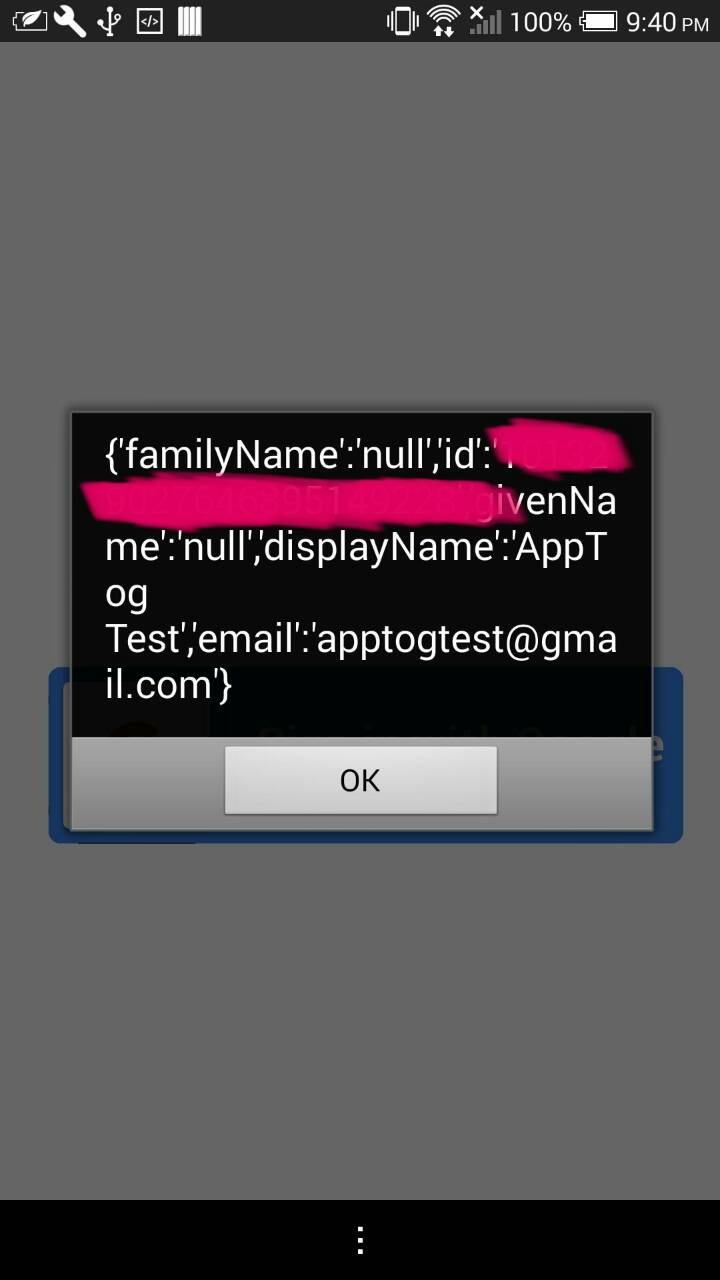
When successfully login. Account information will return to LiveCode. 


These two simple login function take me several days. It's a good start and I will try to build more and make them more stable.

2015年7月23日 星期四

Use LiveCode to Create Android Launcher

Few weeks ago, people ask me if LiveCode can create an android launcher. Today, I've make a quick demo. Surprisingly it's very easy to accomplish with my new external called "HaoUtil1". This external include some useful function in android environment. Such as, log message to Logcat, toast message on screen. One of these functions is to get all installed application's information(name, icon, package name etc.). So, here's the screenshot.


With this function, I can display all the apps. Here I pick only the first 9 apps.

By clicking these icons. It should open corresponding app. Here's comes another external function includes in HaoUtil1. "haoLaunchApp" can provide you the ability to open other apps that installed in your device, inside your LiveCode stacks.

To prove this is a real launcher app, click the home button on mobile phone.

You can see the two selection. One is HTC device default home(launcher) app the other is my LiveCode launcher.

This is a very rough demo. Still have lot of things to do. But it did verify that LiveCode really can do about just anything. So keep going LiveCoders :)

2015年5月8日 星期五

HaoPlayer: LiveCode Android External, Support background audio playing

haoPlayer   

Price: $9.99 USD, include all updates.

Chiu, Chih Hao (HedgeHao) @ 2015/05/08

>>2015/05/08
    *Initial Version


LiveCode Version : 7.0.4

  HaoPlayer is an LiveCode External for Android devices. It is a audio player object for Livecode on android envionment. The difference between haoPlayer and original LiveCode Player is, haoPlayer can play in background! You can play audio in background while you are browsing websites or texting messages or doing other things.

Installation
1.  Copy "revsaveasandroidstandalone.livecodescript" in haoPlayer-1.0.0.zip to 
[LiveCode install path]/Tools/Toolset/libraries/ . (Backup the original "revsaveasandroidstandalone.livecodescript" file in case something went wrong)


2. Add "haoplayer.lcext" and "AndroidManifest.xml" to the copy files of your stack


Documentation & Demo


1. haoPlayerCreate()Create and initialize haoPlayer.


2. haoPlayerAddTrack(AudioFilePath)Add audio file to play list.
3. haoPlayerPlay()
Start playback


4. haoPlayerPause()

Pause playback.


5. haoPlayerResume()
Resume playback


6. haoPlayerNext()
Start to play the next track on play list.


7. haoPlayerPrev()
Play previous track on play list.


8. haoPlayerJumpTo(trackNum)

Play specific track on the play list. Start from 0.


9. haoPlayerGetCurrentTrack()
Retrun the track number which is playing now.


10. haoPlayerGetCurrentTime()
Return the current position of the playing track.

11. haoPlayerSetCurrentTime()Set the current position of the playing track.

12. haoPlayerGetDuration()Return the duration of the current track which is now playing.13. haoPlayerSetVolume(volume)
Set the volume of playback. Volume is in range 0.0 to 1.0

14. haoPlayerSetPlayMode(mode)
There are four mode can be set.

0: Normal Mode, play from the begining track to the last one. No repeat and no loop.
1: Repeat Mode, play from the beining track to the last one and back to the first one.
2: Loop Mode, looping current track.
3: Shuffle Mode, random pick one song to play.

15. haoPlayeGetCurrentTrack()
Return the currentTrack number. Start from 0.


16. haoPlayerClearTrackList
Clear all track on play list and stop playback.

17. haoPlayerDestory()
Remove haoPlayer from application


2015年5月4日 星期一

HedgeHao LiveCode Android External Store -- HaoDropbox4LC for $7.99 USD (2015/05/04 update)


HaoDropbox4LC_Doc


HaoDropbox4LC is an LiveCode Android External for user to create, download, modify and delete folders and files on user's dropbox account. HaoDropbox4LC includes Dropbox Android SDK.
Price : $7.99 USD / each
The payment is processed via PayPal. Please
send an email to me (hedgehao@gmail.com) if you want to place an order.
You will receive an invoice. After the payment is finished, you will
get your external files through your email.


Document    

Chiu, Chih Hao (HedgeHao) @ 2015/05/04

Installation

LiveCode Version : 7.0.4

1. First you need to replace LiveCode built classes for android
with the "Classses" file in haoDropbox4LC-1.0.0.zip. I made some
changes in LiveCode Classes to fit Dropbox's API. Copy "Classes" in
haoDropbox4LC-1.0.0 to [LiveCode install path]/Tools/Runtime/Android.
(Backup the original Classes file in case something went wrong)


2.  Copy "revsaveasandroidstandalone.livecodescript" in
haoDropbox4LC-1.0.0.zip to
[LiveCode install
path]/Tools/Toolset/libraries/ .
(Backup the original "revsaveasandroidstandalone.livecodescript"
file in case something went wrong)


3. Add "haoDropbox4LC.lcext" and "AndroidManifest.xml" to the copy
files of your stack


4. Make sure "Internet" is check in Android permissions setting


5. Set up Dropbox Develop App on
https://www.dropbox.com/developers/apps. Get your API_KEY and API_SCRET


Documentation
function haoDropboxInit(apiKey, apiScret)
Set up your develop account key and scret which get from Dropbox. Need to be call before any other functions.

return : "OK" if success


function haoDropboxLink()
Link to user's Dropbox account.

return : "OK" if success


function haoDropboxUnLink()

Unlink from Dropbox account.


return : "OK" if success

function haoDropboxIsLinked()


Check if application is linked to Dropbox.


return : "true" if the current session is linked to a account, esle retrun "false"


function haoUpload(dropboxPath, localFilePath)

Upload a file to Dropbox
*dropboxPath : the full dropbox path where to
upload file.


*localFilePath : path of the file you want to upload.

return : "OK" if success

function haoDropboxCreateFolder(dropboxPath)

Create a Dropbox folder.

*dropboxPath : the Dropbox path to the new folder.

return : "OK" if success

function haoDropboxListDirectory(dropboxPath)

list all files and subfolders in Dropbox folder.

*dropboxPath : the Dropbox path to the directory for which to list
return : the metadata of all contents in folder (JSON format).

function haoDropboxDownload(dropboxFilePath, localFilePath)

Download a file from Dropbox

*dropboxFilePath : the dropbox path to the file.

*localFilePath : file path where you want to save this file.

return : "OK" if success
, "FAIL" if file does not exists or connection lost.

function haoDropboxMove(fromPath, toPath)


Moves a file or folder (and all of the folder's contents) from one path
to another.
*fromPath : the dropbox path to move from.

*toPath : the dropbox path to move to.


return : "OK" if success, "FAIL" if file does not exists or connection lost.


function haoDropboxCopy(fromPath, toPath)
Copy a file or folder (and all of the folder's contents) from one path
to another.
*fromPath : the dropbox path to copy from.

*toPath : the dropbox path to copy to.


return : "OK" if success, "FAIL" if file does not exists or connection lost.


function haoDropboxDelete(dropboxFilePath)

Delete a file or folder (and all of the folder's contents).


*dropboxFilePath : the dropbox path to delete.
return : "OK" if success, "FAIL" if file does not exists or connection lost.


function haoDropboxShare(dropboxFilePath)

Get a url for sharing the specified directory or file.

*dropboxFilePath : the dropbox path to share.
return : the url of sharing file or directory.